Introduction
Picture this: You are sitting at your desk. You need to write a report. You open your laptop. You see the familiar Word icon. You click it. The program opens. You start typing. Life feels simple. But then, you get a notification. It says your subscription is ending soon. You pause. You scratch your head. This moment of confusion happens to many people.
They face a common dilemma. They must choose between two popular products. One is Microsoft 365. The other is Office 2021. Both give you access to Word, Excel, and PowerPoint. Yet, they are very different under the hood. This choice can affect your wallet. It can affect your workflow.
It can even affect your peace of mind. So, how do you decide? Do you pay once and own it forever? Or do you pay a small fee each month for extra perks? This article will clear up the confusion. We will explore the Microsoft 365 vs Office 2021 debate in full detail.
What is Office 2021?
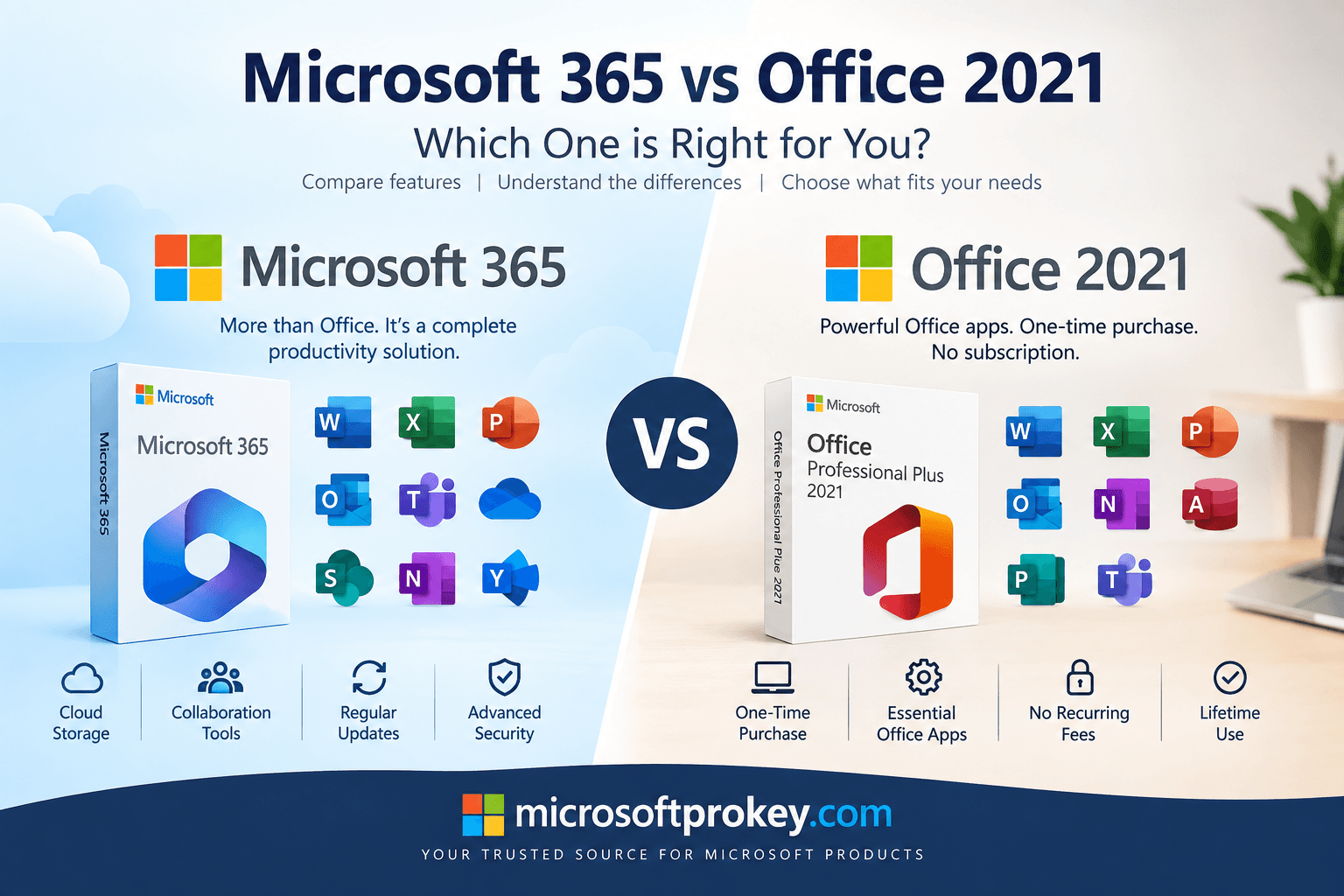
Let us start with the classic option. Office 2021 is a traditional software package. You buy it with a single payment. This is called a one-time purchase. You pay the money upfront. Then, the software is yours forever. There are no recurring bills. This is very appealing for budget-conscious users. However, there is a catch. You only get the apps as they were in 2021. Microsoft does not add new features to this version.
You are stuck with the 2021 feature set. You get security updates for a while. But you miss out on exciting new tools. This version is perfect for people who like stability. It is great for those who hate change. If you only need basic functions, this works well. It does not include cloud storage.
It does not include Teams. It is simply the core apps on your computer. You can install it on one PC or Mac. That is it. It is simple. It is straightforward. It is a one-and-done deal.
What is Microsoft 365?
Now, let us look at the modern alternative. Microsoft 365 is a subscription service. You pay a fee every month or every year. In return, you get the full Office suite. But you get so much more than that. Microsoft adds new tools all the time. You get them instantly. You also get 1 TB of OneDrive cloud storage. This lets you save files online. You can access them from anywhere.
You also get Microsoft Teams. This is a powerful tool for chat and video calls. Furthermore, you can install the apps on multiple devices. This includes your PC, Mac, tablet, and phone. The subscription model ensures you are always up to date. It is a service, not just a product. It connects you to the cloud.
It connects you to your team. It is designed for the modern, mobile world. The Microsoft 365 vs Office 2021 comparison starts with this core difference: ownership versus access.
Licensing Models: Ownership vs. Subscription
The biggest difference is how you pay. This is the heart of the Microsoft 365 vs Office 2021 debate. Office 2021 uses a perpetual license. You buy it once. You own it forever. There is no monthly bill. This is great for your budget. You know exactly what you spend. On the other hand, Microsoft 365 uses a subscription model. You pay as you go. This is like a Netflix for software. You pay a small amount each month.
This can be easier on your cash flow. However, the costs add up over time. Over three years, the subscription can cost more than the one-time purchase. But remember, the subscription includes more services. It is not just about the apps. It is about the cloud storage. It is about the security features.
It is about the constant updates. So, when you compare Microsoft 365 vs Office 2021, look at the total value. Office 2021 is cheaper upfront. Microsoft 365 offers more long-term value. Your choice depends on your needs and your budget.
Feature Updates: Frozen vs. Evergreen
Software changes over time. New tools are invented. Old bugs are fixed. How each product handles this is crucial. Office 2021 is frozen in time. It has the features from 2021. It will never get new ones. You will miss out on future innovations. Microsoft 365 is evergreen. It is always growing. It always gets the latest and greatest features. For example, new Excel functions arrive regularly. New PowerPoint design ideas appear.
You get them immediately. You do not have to wait years for a new version. You do not have to pay extra for upgrades. This is a huge advantage. It keeps your skills current. It keeps your work efficient. However, some users dislike constant change. They prefer a stable environment. Office 2021 provides that stability. The Microsoft 365 vs Office 2021 choice often comes down to your appetite for change. Do you want the latest toys? Or do you prefer a reliable, unchanging tool?
Cloud Services and Storage
The cloud is a big deal today. It lets you access files from anywhere. It enables collaboration. It provides backup. Microsoft 365 embraces the cloud fully. It includes 1 TB of OneDrive storage. You can save all your documents online. You can share them easily. You can work on them from your phone. You can also collaborate in real-time. Multiple people can edit a document at once. This is a game-changer for teams.
Office 2021 does not include cloud services. There is no OneDrive storage included. You save files on your local hard drive. You cannot easily access them from other devices.
You cannot collaborate in real-time. This is a major limitation for many users. In the Microsoft 365 vs Office 2021 comparison, this is a key differentiator. If you work alone and stay at one desk, Office 2021 might suffice. But if you are mobile or work with others, Microsoft 365 is essential.
Application Availability
Both suites include the core apps. You get Word, Excel, and PowerPoint. But there are differences in the extras. Office 2021 Home & Student includes the basics. It does not include Outlook. It does not include Teams. It does not include Publisher or Access. You need to buy a more expensive version for those. Microsoft 365 includes a fuller suite. Depending on your plan, you get Outlook, Teams, Publisher, and Access.
This is a huge value add. Furthermore, Microsoft 365 gives you web versions of the apps. You can use Word in your browser. This is great for quick edits. You do not even need to install the software. Office 2021 does not offer this. You must install the apps on your device. So, the Microsoft 365 vs Office 2021 choice also depends on which apps you need. Do you need Outlook for email? Do you need Teams for chat? If so, Microsoft 365 is the better choice.
Security and Support
Security is a top concern for everyone. Microsoft 365 offers enterprise-grade security. It includes advanced threat protection. It includes data loss prevention. It is constantly updated to fight new threats. This is vital for businesses. It protects sensitive data. It keeps your systems safe.
Office 2021 has basic security updates. But these will stop eventually. Support for Office 2021 ends in October 2026. After that, no more security patches.
This is a serious risk. Your system could become vulnerable. Microsoft 365 support never ends. As long as you pay, you get updates. You also get technical support. You can call or chat with experts. This peace of mind is valuable. The Microsoft 365 vs Office 2021 decision should consider this. Office 2021 is safe for now. But it has a ticking clock. Microsoft 365 offers ongoing protection. It is a safer bet for the long haul.
Device Compatibility
How many devices do you use? Most people have several. They have a desktop at work. They have a laptop at home. They have a tablet for travel. They have a phone for on-the-go. Microsoft 365 is designed for this lifestyle. You can install it on up to five devices. You can switch between them seamlessly.
Your files sync via the cloud. You can start a document on your PC. You can finish it on your phone. Office 2021 is more restrictive. You can only install it on one computer. You cannot install it on your tablet. You cannot install it on your phone.
You are tied to that one machine. This is a major limitation. In the Microsoft 365 vs Office 2021 comparison, flexibility is key. If you use multiple devices, Microsoft 365 is the clear winner. If you only use one PC, Office 2021 is a simpler option.
Cost Analysis Over Time
Let us talk about money. This is often the deciding factor. Office 2021 costs a one-time fee. It starts around $149.99. That seems cheap. But you must look at the long term. Microsoft 365 starts at around $6 per month. That is $72 per year. Over two years, that is $144. Over three years, it is $216. Over five years, it is $360. So, Office 2021 is cheaper over time. However, this comparison is not fair. Microsoft 365 includes cloud storage.
It includes Teams. It includes constant updates. To get similar benefits with Office 2021, you must pay extra. You need to buy OneDrive storage separately. You need to buy Teams separately. You need to buy a new version when it comes out. Suddenly, the cost difference shrinks. The Microsoft 365 vs Office 2021 price debate is nuanced. Office 2021 is cheaper upfront. Microsoft 365 offers more value for the price.
Who Should Choose Office 2021?
Office 2021 is not for everyone. But it is perfect for some people. Consider it if you are a home user. Consider it if you are a student. Consider it if you only need basic apps. Consider it if you have a limited budget. Consider it if you hate recurring bills. Consider it if you use only one computer. Consider it if you have a poor internet connection. Consider it if you do not need cloud storage.
Consider it if you do not collaborate with others. Consider it if you value stability over new features. Office 2021 gives you what you pay for. It is reliable. It is familiar. It does not change. It is a solid tool for basic tasks. It is also good for users in regulated industries. Some companies cannot use cloud services. They need offline software. Office 2021 meets that need. It is a safe, predictable choice.
Who Should Choose Microsoft 365?
Microsoft 365 is the modern choice. It is ideal for most people today. Choose it if you want the latest features. Choose it if you use multiple devices. Choose it if you need cloud storage. Choose it if you collaborate with a team. Choose it if you use Teams for communication. Choose it if you need Outlook for email. Choose it if you travel often. Choose it if you want enterprise-grade security.
Choose it if you like the idea of a service. Microsoft 365 adapts to your life. It grows with you. It keeps you connected. It is perfect for small businesses. It is perfect for freelancers. It is perfect for families. The family plan allows sharing with up to six people. This makes it very cost-effective. In the Microsoft 365 vs Office 2021 debate, Microsoft 365 is the future. It is where Microsoft invests its energy. It is the better choice for the long run.
The End of Support for Office 2021
This is a critical point. Office 2021 has a limited life. Microsoft will stop supporting it. The end of mainstream support is October 2026. After that, no new security updates. No bug fixes. No technical support. Your software will still work. But it will become a security risk. Hackers find new vulnerabilities every day. Without updates, you are exposed. This is a major drawback. It makes the Microsoft 365 vs Office 2021 decision clearer.
Office 2021 is a ticking time bomb. It is fine for now. But you will need to upgrade eventually. Microsoft 365 has no such end date. It is continuously supported. As long as you pay, you are protected. This is a compelling reason to choose the subscription. It is not just about features. It is about safety. It is about peace of mind.
AI and Advanced Features
The world is moving towards AI. Microsoft is leading this charge. They have introduced Copilot. This is an AI assistant for Office apps. It can write documents for you. It can create presentations. It can analyze data. This is a game-changer. Microsoft 365 users can get Copilot. It is an add-on. It costs extra. But it is available. Office 2021 users cannot get Copilot. It is simply not compatible. This is a huge difference.
The Microsoft 365 vs Office 2021 comparison now includes AI. If you want to leverage AI, you must choose Microsoft 365. This is the future of productivity. Office 2021 is stuck in the past. It cannot access these advanced tools. So, if you want to stay ahead of the curve, Microsoft 365 is the only option.
Making the Final Decision
So, how do you choose? It depends on your unique situation. Ask yourself some questions. How many devices do you use? Do you need cloud storage? Do you collaborate with others? Do you want the latest features? What is your budget? If you answered “one” to the first question, Office 2021 might work. If you answered “yes” to the others, Microsoft 365 is better. Think about the long term. Office 2021 is cheaper now.
But you will miss out on updates. You will miss out on cloud features. You will miss out on AI. Microsoft 365 costs more over time. But it offers so much more. It offers flexibility. It offers security. It offers innovation. The Microsoft 365 vs Office 2021 decision is a personal one. There is no single right answer. But this guide has given you the tools. You can now make an informed choice.
Where to Get Your Software
Once you decide, you need to buy the software. You can get it from many places. The Microsoft Store is a safe bet. But you can also find great deals online. For those on a budget, consider a key reseller. If you decide on Office 2021, you can find it at a discount. One such place is Microsoftprokey. You can visit https://microsoftprokey.com/ to explore your options. They offer genuine product keys.
They often have competitive prices. This can save you money. It is a smart way to get your software. Always ensure you buy from a reputable source. This protects you from scams. It ensures you get a valid license. Whether you choose Microsoft 365 or Office 2021, find the best price. Do your research. Compare deals. Then, make your purchase with confidence.
Conclusion
The Microsoft 365 vs Office 2021 debate is more than just a pricing question. It is a question about your workflow. It is about your future needs. Office 2021 is the old guard. It is reliable. It is simple. It is a one-time purchase. It is perfect for basic users. But it is also a dead end.
It will not get new features. It will not get cloud services. It will soon lose security support. Microsoft 365 is the new standard. It is a subscription. It is flexible. It is always up to date. It includes cloud storage. It includes Teams. It includes advanced security.
It is the better choice for most people. It adapts to your life. It grows with you. It keeps you safe. The initial cost might be higher over time. But the value is undeniable. You get more for your money. You get peace of mind. You get the future of productivity. So, take a moment to reflect.
Consider your needs. Consider your budget. Consider your lifestyle. Then, make your choice. Choose the tool that empowers you. Choose the tool that fits your world. In the end, the right choice is the one that works for you. And remember, for great deals on your software, check out Microsoftprokey at https://microsoftprokey.com/. They can help you get started on your productivity journey.
FAQ’s
1. What is the main difference between Microsoft 365 and Office 2021?
The main difference is the payment model. Office 2021 is a one-time purchase. You pay once and own it forever. Microsoft 365 is a subscription. You pay a monthly or yearly fee to use the software.
2. Does Office 2021 include cloud storage?
No, Office 2021 does not include cloud storage. It does not include OneDrive. You have to save files on your local computer. Microsoft 365 includes 1 TB of OneDrive storage.
3. Will Office 2021 get new features?
No, Office 2021 will not get new features. The software is frozen at the 2021 feature set. It only receives security updates. Microsoft 365 gets continuous feature updates.
4. Which is cheaper: Microsoft 365 or Office 2021?
Office 2021 is cheaper upfront. It costs a one-time fee. Microsoft 365 costs more over time because you pay every year. However, Microsoft 365 includes more services like cloud storage and Teams.
5. Can I use Office 2021 on multiple devices?
No, Office 2021 is usually limited to one PC or Mac. Microsoft 365 allows installation on multiple devices, including tablets and phones.